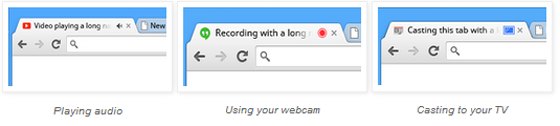
Not since the days of MySpace has it been stylish to embed auto-playing music into your website, yet today, the web is still a very noisy place. Between YouTube, SoundCloud, Spotify, and Vevo, we're bound to have a handful of audio and video tabs open at any given time, and it's not always clear which tab sound is coming from. In the latest beta version of Chrome, Google has made a useful tweak to help users identify noisy tabs. You'll now find a speaker icon next to the name of any tab playing audio, so you can easily find the disturber of the peace. Further, you'll also see corresponding icons on tabs using your webcam, or tabs you're casting to a Google Chromecast.
Silence obnoxious tabs with the latest Google Chrome beta

Some third party tools like MuteTab have existed to help with the issue, but this is the first time Google has addressed the oft-annoying problem head on. In addition, Google has also added malware blocking to the latest Chrome beta update. Chrome already warns you when you try to visit dangerous websites, but now the browser also stops you from downloading files it has identified as malicious. It’s not the only helpful software fix out of Google today: the company also just added quick links in Gmail to open Dropbox folders and check on Seamless orders.
Follow topics and authors from this story to see more like this in your personalized homepage feed and to receive email updates.


